
Chat history
Every course and unit keeps its own conversations on your Mac; reopen one from History and carry on.
Each scope, a course or a unit, keeps its own conversations. They are saved on your Mac as they happen, survive a relaunch, and can be reopened from the History button.
The History list#
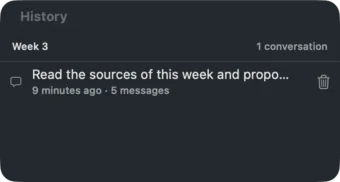
History at the top of the chat panel opens the list for the current scope. Each row shows the conversation's title (its first message), when it was last updated, and its message count. Click a row to open it; it loads at its end so you can carry on. The trash icon deletes a conversation for good.
While a reply is streaming the button is disabled; earlier conversations open once the reply has finished.
New#
New starts an empty conversation. The current one is kept in the history with its title. The assistant's server-side session is new as well, so nothing from the earlier conversation carries over unless you reopen it.
Where the files are#
Conversations are JSON files under ~/Library/Application Support/LectureStudio/chats/, in a folder per library named after the library folder plus a hash of its path, then a folder per scope:
chats/
  Lecture Studio-3f9a2c1d7b4e/
    cs101-fall26/                 course scope
      6C2E….json
    cs101-fall26__week3/          unit scope
      A41B….json
The files are plain JSON with the messages, the citations and the event log, so they can be read, backed up or grepped. Deleting a file removes the conversation from History.
Per library path
The history folder is keyed by the library's path. Moving the library to another place starts a fresh history; the old folder stays where it is.